

A lightweight, dependency-free cookie notice banner written in plain HTML and JavaScript.
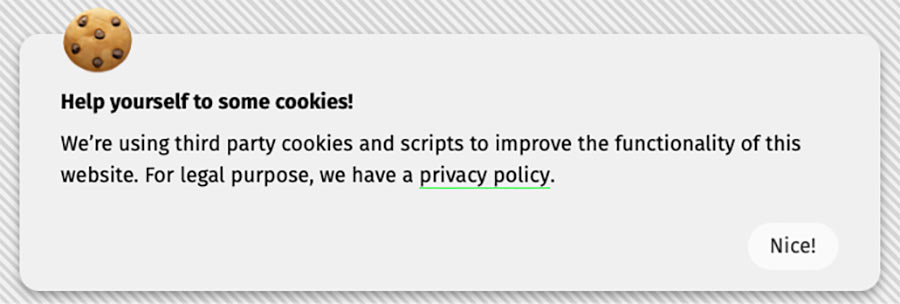
This snippet displays a basic notification informing users that the website uses cookies and hides it after user acknowledgment by storing a browser cookie.
It is designed to be simple, transparent, and easy to integrate into static websites, including Eleventy (11ty).
Important Legal Disclaimer ⚠️
This project is NOT a full cookie consent management solution.
It does not:
- Implement granular consent (analytics / marketing / necessary cookies)
- Block scripts prior to consent
- Provide region-specific compliance logic
- Guarantee compliance with GDPR, ePrivacy Directive, CCPA, CPRA, or any other local or international privacy regulations
Its sole purpose is to inform users that cookies are used and to remember that the notice has been dismissed. This project provides notification, not legal compliance. Use at your own risk.
If your website is subject to specific legal requirements, consult a qualified legal professional and consider using a dedicated Consent Management Platform (CMP).
Features
- No dependencies
- No build step
- Plain JavaScript (ES5+)
- Stores dismissal state in a browser cookie
- Works on static websites
- Safe cookie defaults (
SameSite=Lax,Secureon HTTPS)
How It Works
- On page load, the script checks for a cookie named
cookie-notice-dismissed - If the cookie is present, the notice is hidden by adding the
rd-is-hiddenstate class - When the user clicks the confirmation button, the cookie is set and the notice gets
rd-is-hidden - The notice stays hidden for subsequent visits
Default cookie lifetime: 31 days
Installation
⚠️ Performance tip: For production, download the script and host it on your own server rather than loading it from a CDN.
Required HTML Markup
The script expects the following mandatory hook classes. If they are missing or renamed, the script safely does nothing.
<div class="cookie-notice rd-js-cookie-consent">
  <div class="cookie-notice__content">
    <h3>🍪</h3>
    <p class="bold">Help yourself to some cookies!</p>
    <p>We’re using third party cookies and scripts to improve the functionality of this website. For legal purpose, we have a <a href="/legal/privacy">Privacy Policy</a>.</p>
    <div class="right">
      <button class="cookie-notice__button rd-js-cookie-accept">Nice!</button>
    </div>
  </div>
</div>
Required hooks (Mandatory)
Be sure to include the mandatory hook classes on your HTML elements:
| Hook class | Purpose |
|---|---|
rd-js-cookie-consent |
Root container the script hides by toggling rd-is-hidden |
rd-js-cookie-accept |
Button (inside the container) that dismisses the notice |
Hook classes are read by the JavaScript and never styled — presentational styling belongs to separate classes (cookie-notice, cookie-notice__button) which you are free to rename or replace.
Required CSS (Minimum)
The Rare Styles Library already includes styles for the cookie consent block (including the rd-is-hidden state). If you use this script on its own, make sure to add the required styles. At minimum, the .rd-is-hidden { display: none; } rule must exist — the script hides the notice by toggling that class, never by inline styles.
.cookie-notice {
    max-width: var(--site-max-width);
    display: block;
    position: fixed;
    bottom: 10px;
    left: 50%;
    transform: translateX(-50%);
    background: #f0f0f0;
    color: #000;
    padding: var(--space-lg) var(--space-lg) var(--space-md);
    box-shadow: 0 4px 8px rgba(0, 0, 0, 0.4);
    border-radius: 15px;
    box-sizing: border-box;
    z-index: 1000;

    @include bp.mobile {
        padding: 15px 5%;
        width: 90%;
    }
}

.cookie-notice__content {
    position: relative;
}

.cookie-notice__content h3 {
    position: absolute;
    margin: 0;
    top: -50px;
    font-size: 3.5em;

    @include bp.mobile {
        font-size: 2.5em;
        top: -60px;
    }
}

.cookie-notice__content a {
    color: #000;
    text-decoration: none;
    border-bottom: 1px solid var(--brand-color);
}

.cookie-notice__content button {
    position: relative;
    display: inline-block;
    margin-top: var(--space-md);
}

/* State class the script toggles — mandatory */
.rd-is-hidden {
    display: none;
}
You are free to fully replace these styles with your own design system.
JavaScript Setup
Include the script synchronously, right after the notice markup (no defer, no async):
<script src="/assets/js/cookie-consent.js"></script>Placement matters: the script initializes immediately when the notice markup is already parsed, so the dismissal check runs before the browser paints the content that follows — a returning visitor never sees the notice flash. If the markup is not there yet, the script falls back to DOMContentLoaded. No configuration is required.
Optional anti-flash guard. If you load the script with defer/async or from a CDN late in the page, the paint-then-hide flash comes back for returning visitors. In that case add this one-liner right after the notice markup:
<script>
if (document.cookie.indexOf('cookie-notice-dismissed=true') !== -1) {
document.querySelector('.rd-js-cookie-consent').classList.add('rd-is-hidden');
}
</script>
Assumptions Made by the Script
- JavaScript is enabled
- Cookies are enabled
- The site operates on a single domain
- The notice markup exists on the page where the script runs
If any of these assumptions are false, the script will fail silently.
Customization
You may safely change:
- Text content
- Styles and class names
- Cookie lifetime (in days)
- Cookie name
The rd-js-cookie-consent / rd-js-cookie-accept hook classes and the rd-is-hidden state class are the script’s contract — if you rename them, you must update the script accordingly.
Changelog
v3.0.0
- Breaking: hooks moved to the
rd-jscontract — the script finds elements via therd-js-cookie-consent/rd-js-cookie-acceptclasses; thecookie-notice/cookie-notice-acceptIDs are no longer read - Breaking: visibility is expressed by the
rd-is-hiddenstate class instead of inlinestyle.display - Anti-FOUC: the script no longer waits for
DOMContentLoadedwhen the notice markup is already parsed — included synchronously after the markup, it hides a dismissed notice before paint; an optional inline guard is documented fordefer/CDN setups - Added a guard: pages without the markup no longer run the listeners