




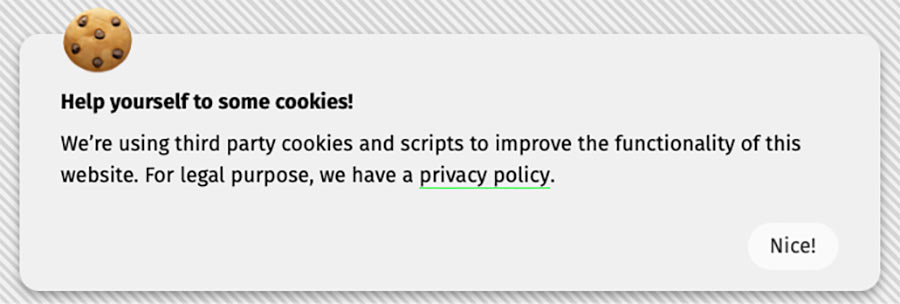
A lightweight, dependency-free cookie notice banner written in plain HTML and JavaScript.
This snippet displays a basic notification informing users that the website uses cookies and hides it after user acknowledgment by storing a browser cookie.
It is designed to be simple, transparent, and easy to integrate into static websites, including Eleventy (11ty).
Important Legal Disclaimer ⚠️
This project is NOT a full cookie consent management solution.
It does not:
- Implement granular consent (analytics / marketing / necessary cookies)
- Block scripts prior to consent
- Provide region-specific compliance logic
- Guarantee compliance with GDPR, ePrivacy Directive, CCPA, CPRA, or any other local or international privacy regulations
Its sole purpose is to inform users that cookies are used and to remember that the notice has been dismissed. This project provides notification, not legal compliance. Use at your own risk.
If your website is subject to specific legal requirements, consult a qualified legal professional and consider using a dedicated Consent Management Platform (CMP).
Features
- No dependencies
- No build step
- Plain JavaScript (ES5+)
- Stores dismissal state in a browser cookie
- Works on static websites
- Safe cookie defaults (
SameSite=Lax,Secureon HTTPS)
How It Works
- On page load, the script checks for a cookie named
cookie-notice-dismissed - If the cookie is missing, the notice is displayed
- When the user clicks the confirmation button, the cookie is set
- The notice is hidden for subsequent visits
Default cookie lifetime: 31 days
Installation
Required HTML Markup
The script expects the following mandatory element IDs. If they are missing or renamed, the script will not function.
<div id="cookie-notice" class="cookie-notice">
  <div class="cookie-notice__content">
    <h3>🍪</h3>
    <p class="bold">Help yourself to some cookies!</p>
    <p>We’re using third party cookies and scripts to improve the functionality of this website. For legal purpose, we have a <a href="/legal/privacy">Privacy Policy</a>.</p>
    <div class="right">
      <button id="cookie-notice-accept" class="cookie-notice__button">Nice!</button>
    </div>
  </div>
</div>
Required IDs (Mandatory)
Be sure to include the mandatory IDs in your HTML elements:
| ID | Purpose |
|---|---|
cookie-notice |
Root container shown / hidden by the script |
cookie-notice-accept |
Button that dismisses the notice |
These IDs are hard-coded in the JavaScript file.
Required CSS (Minimum)
The Rare Styles Library already includes styles for the cookie consent block. If you use this script on its own, make sure to add the required styles. At minimum, the notice must be hidden by default.
.cookie-notice {
    max-width: var(--site-max-width);
    display: block;
    position: fixed;
    bottom: 10px;
    left: 50%;
    transform: translateX(-50%);
    background: #f0f0f0;
    color: #000;
    padding: var(--space-lg) var(--space-lg) var(--space-md);
    box-shadow: 0 4px 8px rgba(0, 0, 0, 0.4);
    border-radius: 15px;
    box-sizing: border-box;
    z-index: 1000;

    @include bp.mobile {
        padding: 15px 5%;
        width: 90%;
    }
}

.cookie-notice__content {
    position: relative;
}

.cookie-notice__content h3 {
    position: absolute;
    margin: 0;
    top: -50px;
    font-size: 3.5em;

    @include bp.mobile {
        font-size: 2.5em;
        top: -60px;
    }
}

.cookie-notice__content a {
    color: #000;
    text-decoration: none;
    border-bottom: 1px solid var(--brand-color);
}

.cookie-notice__content button {
    position: relative;
    display: inline-block;
    margin-top: var(--space-md);
}
You are free to fully replace these styles with your own design system.
JavaScript Setup
Place the script file anywhere you prefer and include it after the markup, or just before the closing </body> tag.
<script src="/assets/js/cookie-consent.js"></script>The script runs automatically on DOMContentLoaded. No configuration is required.
Assumptions Made by the Script
- JavaScript is enabled
- Cookies are enabled
- The site operates on a single domain
- The notice markup exists on the page where the script runs
If any of these assumptions are false, the script will fail silently.
Customization
You may safely change:
- Text content
- Styles and class names
- Cookie lifetime (in days)
- Cookie name
If you rename required IDs, you must update the script accordingly.